Most Indian SMBs run WhatsApp support the same way: one phone, one person, one app called WhatsApp Web. It works until it doesn't — until two people need to reply at once, until a customer asks "who did I speak to last time?", until the founder goes on leave and the number goes dark. A shared team inbox with a built-in CRM fixes all of that without changing your number, and — this is the part most people miss — it runs on the same WhatsApp Business Account that already sends your OTPs and campaigns. Here is what that actually means, and how it differs from the single-person WhatsApp Web setup you're probably on today.
Why one-person WhatsApp Web breaks at scale
The consumer WhatsApp app — and WhatsApp Web — is built around a single identity. The session lives on one phone. You can mirror it to a laptop, but only one human can really "own" the chat at a time. The moment your support volume outgrows one person, the cracks show:
- No assignment. Two agents open the same chat, both start typing, and the customer gets a confused double reply — or worse, both assume the other has it and nobody replies.
- No history beyond the thread. WhatsApp shows you the message log, but nothing about the person — no order ID, no plan, no "this customer already complained twice this month."
- No handover. When the person holding the phone is asleep, sick, or leaves the company, the institutional memory leaves with them.
- It fights your API. A number registered on the WhatsApp Business API (the thing that sends your OTPs) cannot also be used in the regular WhatsApp app. You have to pick one. So teams end up juggling a personal number for support and an API number for OTPs — two numbers, two brand impressions, double the confusion.
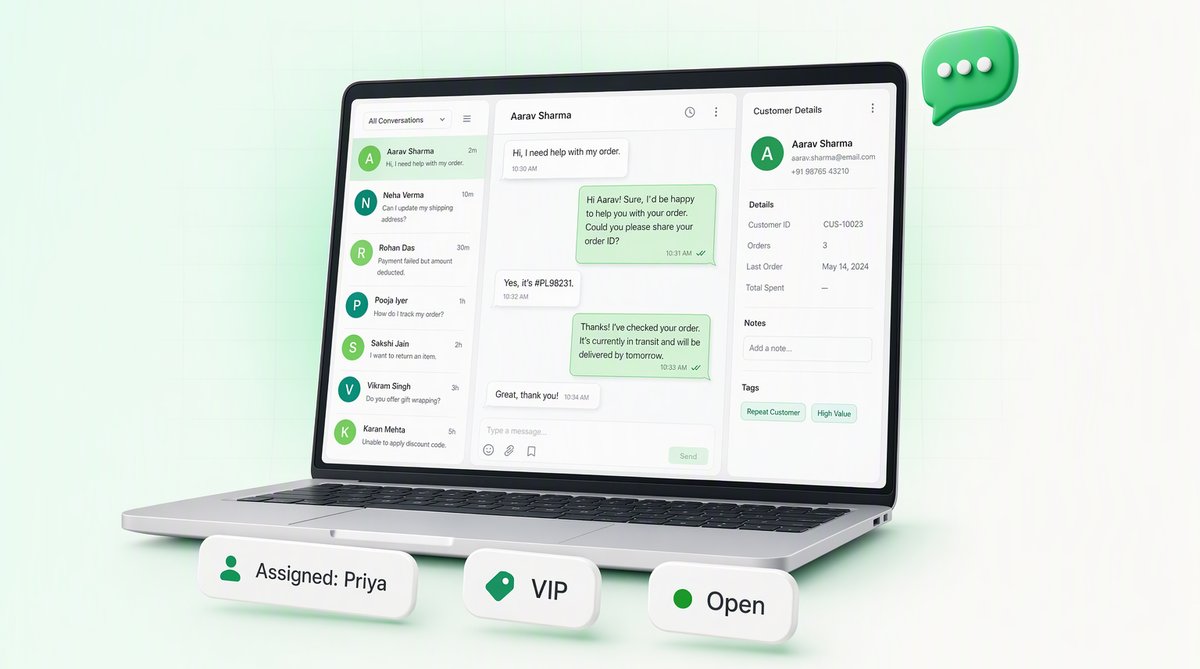
A team inbox is the answer to all four. It puts the conversation on a server instead of a phone, so any agent on your team can see it, claim it, and reply from a browser — under one business number.
One WABA, shared across the whole team
QuickAuth's team inbox sits on top of your WhatsApp Business Account (WABA). You connect the number once. After that, every agent you add — support reps, a sales person, the founder — logs into the same dashboard and sees the same live stream of incoming conversations. There is no app to install on a particular phone and no SIM to pass around.
Because it's built on the official WhatsApp Business API, the same number that customers message for help is the number that already does your transactional work. That single fact removes a whole category of headaches:
- Customers see one verified business name whether they're receiving a login code or asking where their order is.
- You don't pay for, or babysit, a second number and a second registration.
- Conversation context and transactional context live on the same account, so an agent answering a "my OTP didn't arrive" question is looking at the exact same number that tried to deliver it.
Assigning chats to agents
The core job of a shared inbox is making sure every conversation has exactly one owner. In the QuickAuth inbox, a conversation can be assigned to a specific agent — picked up manually by whoever grabs it, or routed to a teammate by someone else. Once a chat is assigned, everyone can still see it, but it's clear who is on the hook to reply. No more double replies, no more dropped threads.
A typical flow looks like this:
Incoming queue            Assigned to        Status
──────────────────────────────────────────────────────
Priya  — refund query     → Anjali           open
Rohan  — OTP not received  → Vikram            open
Meena  — pricing question  → (unassigned)      new
Sameer — order #4821       → Anjali           waiting
When Anjali finishes with Priya, she marks the chat resolved and it drops out of the active queue. If Vikram needs help with Rohan's OTP issue, he reassigns the chat to someone who knows the auth side. The conversation — and everything attached to it — moves with the assignment. Nothing is lost in a personal phone that someone else can't open.
The CRM: contacts, notes and tags
A team inbox without memory is just a faster way to forget things. The built-in CRM is what turns the inbox from a chat window into an actual support system. Every person who messages your number becomes a contact record, and that record travels with them across every future conversation.
On each contact you can keep:
- Notes — free-text the team can read at a glance: "VIP, has 3 outlets," "promised a callback Tuesday," "already escalated to billing." The next agent who opens the chat starts informed instead of cold.
- Tags — short labels you define yourself: vip, refund-pending, wholesale, angry, upsell. Tags let you filter the inbox ("show me every open refund-pending chat") and turn one-off conversations into something you can actually manage as a list.
The point is continuity. When a customer comes back three weeks later and a different agent picks up, that agent isn't guessing. The notes and tags are right there in the side panel next to the chat. For a small team where everyone wears several hats, that shared memory is often the difference between "this business knows me" and "I have to explain everything again."
The 24-hour customer-service window
This is the one WhatsApp rule that shapes how every business inbox works, so it's worth getting right. WhatsApp distinguishes between two kinds of outbound message:
- Free-form replies — anything you type yourself: plain text, an image, a quick answer. You can only send these inside a 24-hour window that opens each time the customer messages you. Reply within 24 hours and it's free and unrestricted.
- Template messages — pre-approved formats Meta has signed off on. These are the only thing you can send outside the 24-hour window, and they're what your OTPs and campaigns use.
- The customer writes inA 24-hour window opensAnd every further message from them re-opens it.
- Inside 24 hoursFree-form replies, unrestrictedPlain text, an image, a quick answer — anything an agent types themselves. Free, and two-way.
- At 24 hoursFree-form stops workingNothing an agent types will reach them any more.
- After thatOnly an approved template re-engagesThe same kind of pre-approved message your OTPs and campaigns go out on.
So the inbox’s real job is not wasting this window: assign fast, reply inside the day.
So the practical rhythm of a support team is: a customer messages you, the 24-hour window opens, and your agents can chat back and forth freely for the next day. The inbox makes this window visible — agents can see at a glance which conversations are still open for free-form replies and which have lapsed and would need an approved template to re-engage. If a customer hasn't written in over a day, you can't just type a message to them; you'd send a template instead.
A good team inbox is essentially a tool for not wasting that window: assign fast, reply inside the day, and you stay in cheap, frictionless, two-way conversation. Let it lapse and re-engagement gets slower and more restricted. Knowing the rule is half of running WhatsApp support well.
Same account as your OTPs, campaigns and chatbot
The reason QuickAuth's inbox is more than a standalone helpdesk is that it shares the WABA with everything else you do on WhatsApp:
- OTPs. The number sending login codes is the number customers reply to. When someone writes "my code didn't come," the agent and the auth system are looking at the same account.
- Campaigns. When a utility or marketing campaign goes out and customers reply, those replies land straight in the same team inbox — assigned, tagged, and tracked like any other conversation.
- Chatbot. A WhatsApp chatbot can field the routine questions automatically and hand off to a human agent in the same inbox the moment it's out of its depth — so the customer never repeats themselves and the agent picks up mid-thread.
Run all of this on separate tools and you get separate silos: one vendor for OTP, a personal phone for support, a third app for broadcasts, and no shared view of the customer. Run it on one WABA and the customer is one continuous relationship — login, message, campaign, reply — visible to your whole team in one place.
Is it worth it for a small team?
Honestly, if you're a solo operator answering a handful of messages a day, WhatsApp Web on your phone is fine — don't over-engineer it. The team inbox earns its place the moment any of these are true:
- More than one person needs to reply to customers.
- You're already on the WhatsApp Business API for OTPs or campaigns and want support on the same number.
- You're losing context between conversations — repeating questions, forgetting who promised what.
- You want support to survive one person going on leave or leaving the company.
That's the real difference between one-person WhatsApp Web and a shared team inbox: one is a chat app that happens to be open on a laptop, the other is a system your whole team can run a business on — with the memory, the assignment, and the same trusted number doing your OTPs, campaigns, and conversations all at once.