You uploaded a clean list, wrote a decent template, hit send — and the dashboard says 62% delivered. A third of your audience never got the message, and you paid for every one of them. A 60–70% delivery rate on WhatsApp marketing campaigns is one of the most common complaints we hear from businesses in India, and the frustrating part is that it's rarely a "bad list" problem. It's usually the lane your messages travel in and the health of your WhatsApp number. Here is exactly why marketing sends get throttled to 60–70%, and the levers that move it back toward 95%+.
First, what "delivery rate" actually measures
On WhatsApp there are three states, and mixing them up hides the real problem:
- Sent — Meta accepted the message from you.
- Delivered — it reached the recipient's device (one grey tick → two grey ticks).
- Read — the recipient opened it (two blue ticks).
Delivery rate is delivered ÷ sent. When it sits at 60–70%, it means Meta accepted your messages but a large chunk never landed — which points at either your number's standing with Metaor the message category, not your copy.
Why marketing campaigns get throttled to 60–70%
1. Marketing-tier frequency capping
Meta applies a per-user frequency cap to marketing-category template messages. If a person has already received several marketing messages from businesses in a short window, Meta simply does not deliver another marketing template to them — regardless of how good your offer is. On a large promotional blast, this alone can knock 20–30% off delivery, and it gets worse the more marketing traffic your recipients are already receiving.
2. A yellow or red Quality Rating
Every WhatsApp number carries a Quality Rating (green / yellow / red) and a messaging limit tier. Blocks, reports and "this was spam" signals drag the rating down. Once it slips to yellow or red, Meta lowers your daily reachable audience and throttles delivery — so the same campaign that delivered at 95% last month delivers at 65% after a couple of aggressive sends. Marketing content is judged far more harshly here than transactional content.
3. Marketing opt-in friction
Marketing templates require explicit marketing opt-in. Numbers that never opted in — or opted in long ago and forgot — are more likely to block or ignore, which feeds back into the Quality Rating and the frequency cap above. A list that looks "clean" on a spreadsheet can still be full of low-intent recipients as far as Meta is concerned.
4. Aggregator hops between you and Meta
Many WhatsApp tools are resellers sitting on top of another aggregator, which sits on top of Meta. Every hop adds latency, retries and a place for messages to silently fail or get rate-limited before they ever reach Meta's Cloud API. You see it as "undelivered" with no clear reason.
How to get delivery back to 95%+
Send from the number that already reaches them
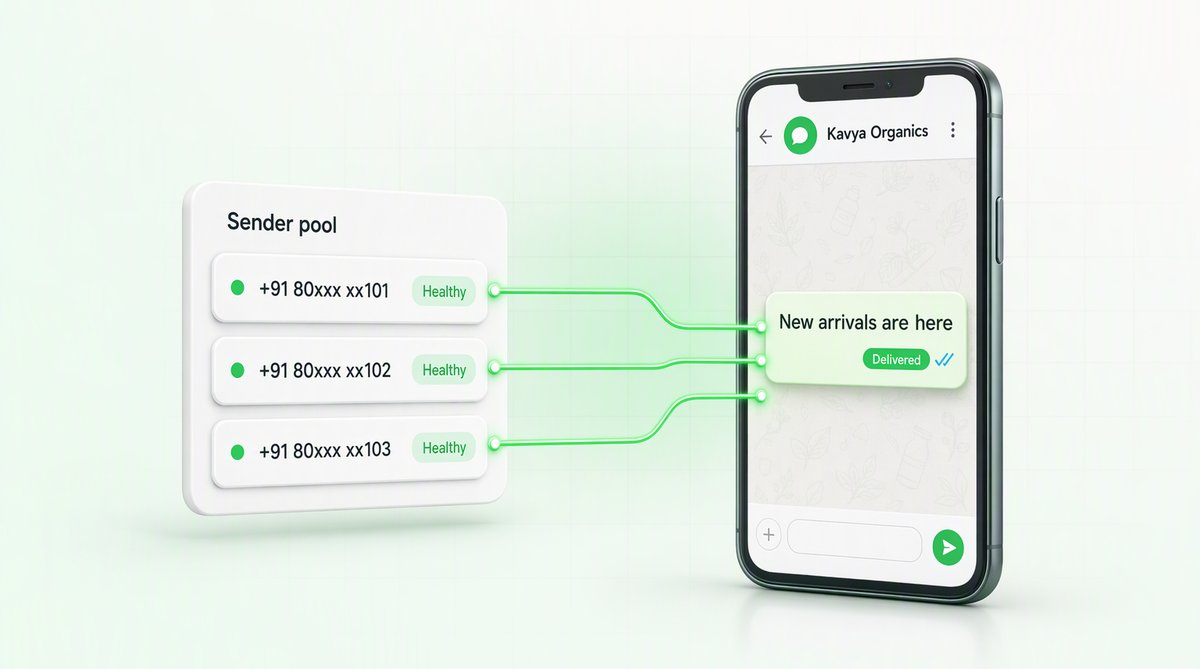
This is the lever most teams never touch. Delivery is not only about what you send — it is about which number you send it from. If a recipient's last WhatsApp message from you arrived on one WABA, the next one should leave from that same WABA. Rotating senders for the same person trains Meta to read the traffic as spam, and delivery on every number in the account falls with it.
QuickAuth's smart routing keeps that relationship warm automatically. Each recipient is pinned to the WABA that last delivered to them, on a rolling 30-day window. A recipient with no history goes to the sender you nominate; beyond that, load is spread deterministically across the pool so no single number carries the whole campaign. Sender and template quality are re-read between waves, and the send halts against a number that has gone RED rather than pushing through it.
This is what a 60–70% delivery rate usually is.
The content has to genuinely qualify — a discount blast in notification clothing gets re-categorised.
Protect your Quality Rating
- Honour STOP/opt-out instantly — one ignored opt-out does outsized damage.
- Keep templates clean: no all-caps, no naked URLs, no misleading buttons.
- Match category to content — marketing copy inside a utility template is the #1 rejection and re-categorisation trigger.
- Warm up new numbers gradually instead of blasting on day one.
Send on a direct Meta Cloud API connection
Cutting the aggregator hops out removes a whole class of silent failures and gives you real-time, per-message delivery status instead of a black box. QuickAuth connects directly to the official Meta WhatsApp Business Cloud API as a Tech Provider — no reseller or middle-aggregator between your campaign and Meta.
Monitor deliverability continuously, not after the fact
Delivery decay is gradual. By the time a campaign obviously underperforms, your Quality Rating has usually been sliding for days. Watching quality, tier and per-template delivery in real time lets you catch and fix a slide before it costs you a whole campaign.
Where QuickAuth fits
QuickAuth is built around this problem. It connects directly to Meta's WhatsApp Cloud API as a Tech Provider (no aggregator markup, no proxy layer), pins each recipient to the WABA that last reached them, spreads the remaining load across a pool rather than one number, and re-reads sender and template quality between waves — halting a send before a number goes unsendable. Quality Rating, messaging tier and template-level delivery sit in one dashboard, so a slide never catches you by surprise.
To be straight about it: no provider can "guarantee" a delivery number on marketing-category sends, because Meta's frequency cap and quality throttling sit above every provider. And nobody can move promotional content into another category to dodge them — Meta decides the category, re-classifies what is mislabelled, and penalises the account that tried. What moves the needle is sender health: the right number for that recipient, a pool rather than a single sender, and a send that stops when quality drops.
If your WhatsApp marketing is stuck in the 60–70% range, the fastest way to see what's dragging it down is our free WhatsApp delivery audit — you'll get your real delivery rate and exactly what a bad rate is costing you within 24 hours. Or talk to us about moving your sends onto a direct Cloud API connection with delivery-optimised routing.