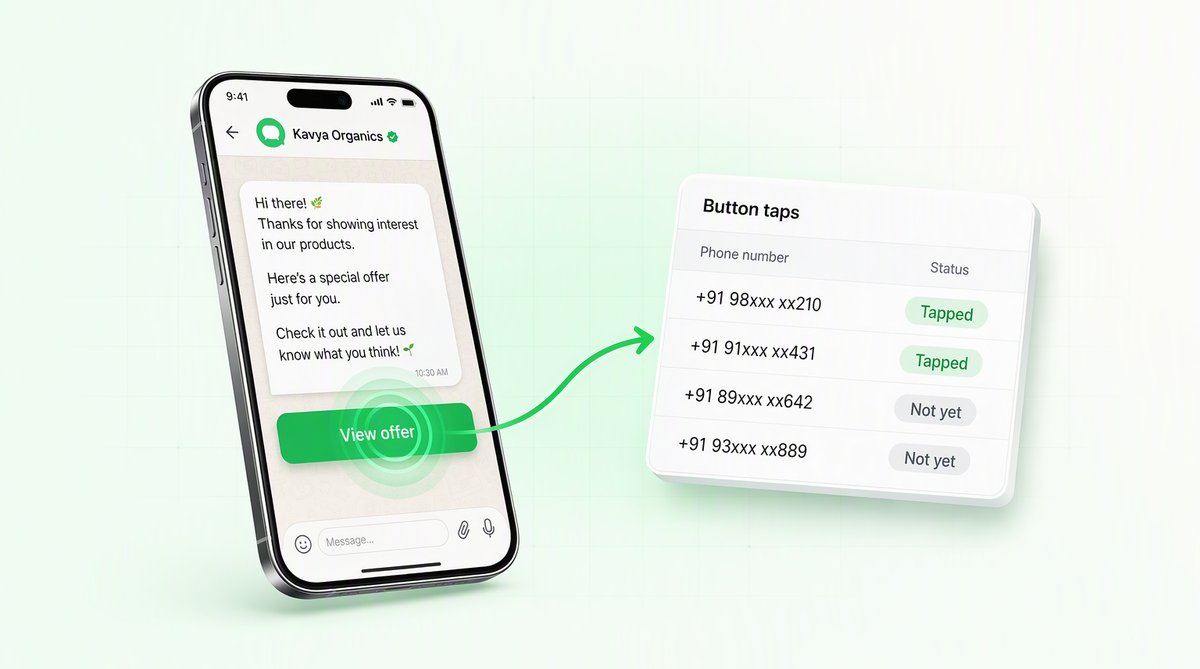
You send a WhatsApp campaign with a big “Shop now” button. Meta's dashboard tells you it was delivered to 9,400 people and read by 6,800. Then you ask the obvious question — how many actually tapped the button? — and the answer is silence. Meta does not report URL-button clicks on template messages. Not per-recipient, not in aggregate, not anywhere. This is the single most important conversion signal in a WhatsApp campaign, and it is the one number the platform hides. Here is why that gap exists, and how a tracked-redirect wrapper recovers it without changing where your customers land.
What Meta tells you — and what it doesn't
Every WhatsApp Business API message emits status webhooks as it moves through the system. You get sent, delivered,read, and failed. For most of the funnel this is genuinely useful: you can see your deliverability rate, spot a number with a degraded quality rating, and prove that the message reached the handset.
But the funnel stops at read. When a recipient taps a quick-reply button, that tap comes back to you as an inbound message, so you can count it. When a recipient taps a URL button — the “Shop now”, “Track order”, “Pay invoice” kind that links out to your website — WhatsApp opens the link in the in-app browser and tells you nothing. There is no button_clicked webhook. There is no field for it in the message status payload. From Meta's side, the moment a URL button is pressed is invisible to the sender.
This is not an oversight you can configure your way around. It is the documented behaviour of the platform, and it is the same for every provider on top of the WhatsApp Business API. Anyone who claims native URL-button click reporting from Meta is mistaken — the data simply is not in the API.
- sentMeta accepted the message from you
- deliveredIt reached the handsetThis is the rung your deliverability rate is measured on.
- readThe recipient opened itThe last event the platform will tell you about.
- no webhook existsThe recipient taps your URL buttonNo button_clicked event, and no field for it in the message status payload. WhatsApp opens the link in its in-app browser and reports nothing back.
Why the click matters more than the read
A read tells you the message was seen. A click tells you the offer worked. Those are completely different things, and only one of them predicts revenue:
- Campaign ROI. If two templates both deliver at 98% but one drives twice the click-through, you want to send the second one to everybody. Without click data you are flying blind and optimising on read rate, which barely moves.
- Creative testing. Button copy, offer framing, send time, audience segment — none of it can be A/B tested honestly if the conversion event is missing. Read rate is a vanity metric; the tap is the intent signal.
- Attribution. When a customer buys an hour after your campaign, was it the WhatsApp message or a coincidence? A tracked click ties the purchase back to the exact recipient, campaign, and template button that started the journey.
How a tracked redirect recovers the click
The fix is an old, reliable web pattern applied to WhatsApp: a tracked redirect. Instead of putting your raw destination URL into the template button, QuickAuth puts a short link that points back to our redirect endpoint. Every recipient in a campaign gets a unique token baked into that link.
When someone taps the button, their browser hits our endpoint first. We record the tap — which token, which campaign, which template, at what time — and then immediately issue an HTTP redirect to your real destination. The hop is invisible to the user; they see your page load as normal. What changed is that the tap left a footprint on the way through.
Template button shows:   "Shop now"
Button URL (what we set): https://quickauth.in/c/Xk29ab7Q

Recipient taps the button
   |
   v
GET https://quickauth.in/c/Xk29ab7Q      <-- tap recorded here
   |   (token Xk29ab7Q -> recipient #4821, campaign "june-sale", template "promo_v3")
   v
302 Found
Location: https://yourstore.com/sale?utm_source=whatsapp   <-- real destination
   |
   v
Recipient lands on your actual page
The token is opaque and single-purpose. It does not expose the recipient's phone number in the URL; it is just a key that maps, on our side, to the person, campaign, and template button it belongs to. That mapping is what turns an anonymous web hit into per-recipient attribution.
Per-recipient versus aggregate
Because each recipient gets their own token, you are not limited to a single campaign-wide click count. You get two layers of data:
- Aggregate. The headline number — how many unique taps a campaign or a specific template button earned, and the click-through rate against delivered. This is what you watch to compare campaigns and templates against each other.
- Per-recipient. The granular layer — whichindividual contact tapped, and when. This is what powers retargeting (“everyone who tapped but didn't buy”), suppression (“stop messaging people who never engage”), and true attribution back to a downstream conversion.
The same plumbing also rolls up per-template and per-button: if a template carries two URL buttons, “View offer” and “Talk to us”, each gets its own token namespace, so you can see which button actually pulls taps rather than guessing.
The real link stays the destination
A fair worry about any redirect layer is that it changes the customer experience or breaks deep links. It does not. The tracked redirect is a pass-through: we record the tap in milliseconds and hand the browser straight to the exact URL you configured, query parameters and all. Your utm_* tags, order IDs, and product paths survive the hop untouched.
A few practical points worth being honest about:
- It is one extra HTTP hop, served from infrastructure tuned for it, so the added latency is negligible — the user sees your page, not a loading screen.
- The displayed button text is unchanged. The recipient reads “Shop now” and taps it; the redirect URL underneath is never shown in the chat.
- It counts taps, not conversions. A tracked click proves intent — the person chose to act. Whether they then completed a purchase is something you tie together with your own analytics, using the per-recipient attribution as the join key.
One toggle, no template surgery
You do not rewrite your templates to get this. In QuickAuth, tracking is a single “Track clicks” toggle per link. Flip it on for a button and the platform swaps your raw URL for a tracked-redirect link at send time, mints a unique token for every recipient in the send, and starts populating the click report. Flip it off and the button reverts to your plain URL with no tracking. Because it is per-link, you can track the “Shop now” CTA while leaving a “Privacy policy” link untouched.
Nothing about this requires re-submitting the template to Meta for approval. The template body, the button label, and the button type are all unchanged; only the URL value differs at send time, and a tracked-redirect link is a perfectly ordinary HTTPS URL as far as Meta's review is concerned.
The one number every other platform drops
WhatsApp is the highest-intent channel most Indian businesses have, and campaigns are only getting more sophisticated. Yet the conversion event at the heart of every one of those campaigns — the URL-button tap — is the single metric Meta's own webhooks refuse to report. Most tools quietly inherit that blind spot and show you read rate as if it were engagement.
A tracked redirect closes the gap with a pattern the web has trusted for decades: wrap the link, record the hop, send the user on to the real destination. The result is per-recipient, per-campaign, per-template button attribution on a channel that was supposed to be a black box — and a campaign report you can actually optimise against, instead of one that stops at “read”.